Printable tournament brackets
Pick a blank template for 4 to 64 teams and print it from your browser, or print a bracket you filled in with real names and results.
- No account, no ads
- Private until you share it
- Live links and embedding
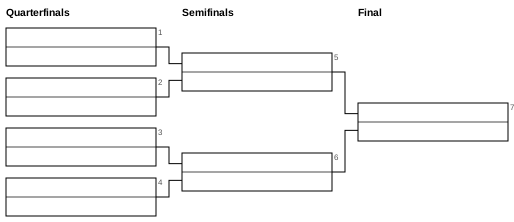
Blank bracket templates
The templates are single elimination brackets with empty lines for the team names and the scores. Choose the size that fits your event:
| Template | Games | Notes |
|---|---|---|
| 4 teams | 3 | Two semifinals and a final. |
| 6 teams | 5 | Bracket for 8 with two byes for the top two seeds. |
| 8 teams | 7 | Three rounds, no byes. |
| 12 teams | 11 | Bracket for 16 with four byes. |
| 16 teams | 15 | Four rounds, no byes. |
| 32 teams | 31 | Five rounds, drawn in two mirrored halves on one page. |
| 64 teams | 63 | Six rounds, mirrored halves, type stays above 8 pt. |
Each size has its own page with the standard seeding, the byes, the number of games in other formats and a button to fill the bracket in online. The number of games is always the number of teams minus 1. For 6 teams, the bracket has 8 slots, so 2 slots stay empty as byes, and 6 teams play 5 games. For 12 teams, 4 byes are needed and 11 games are played.
How to print
- Click the template you want. It opens in the page right here.
- Choose the paper size, A4 or Letter. Use Letter in the United States and Canada.
- Press Ctrl+P (Cmd+P on a Mac) to open the print dialog.
- Set the orientation to landscape and the scale to 100 percent or "fit to page". Turn off headers and footers if you do not want the web address on the paper.
- Print. The bracket is always one sheet, and the lines are black so that they come out well on a laser or inkjet printer.
The blank templates are also available as SVG files to download. There are no PDF files, but you can choose "Save as PDF" in the print dialog if you want one.
Print a filled-in bracket
If you already know the names, you do not have to write them in by hand. Open the bracket maker, enter the teams and print from there. The sheet carries the tournament name at the top, and any results you entered are printed too. This works for up to 64 participants on one page: from 32 participants on, the single elimination bracket is printed in two mirrored halves with the final in the middle, so the type stays readable. With 65 to 128 participants, everything is shrunk onto a single sheet and is barely readable. For such large fields, use Groups + knockout or view the bracket on screen.
For round robin tournaments, print the schedule and the table from the round robin generator.
Tips for the wall
- Print on 11 × 17 in (A3) at a copy shop if you want the bracket to be readable from a few steps away. Landscape A4 or Letter is good for a clipboard or a bulletin board.
- Use a pencil for the first rounds, then pen once results are final.
- Write the winner into the next round right after each game, so the sheet is always current. One person at the scoring table should be in charge of it.
- For a public event, also share the live link so that people can follow the results on their phones. Shared brackets update in all open views.
- Keep a second copy of the first-round pairings in case the sheet gets damaged or wet.
Questions and answers
Which sizes are available as blank templates?
Brackets for 4, 6, 8, 12, 16, 32 and 64 teams. Each size has its own page, for example the 16 team bracket.
Do I get a PDF?
No. The templates print directly from your browser with Ctrl+P, and they can be downloaded as SVG files. In the print dialog you can choose "Save as PDF" if you need that.
Is it A4 or Letter?
You can choose either one. Both are printed in landscape and fit on one sheet.
How many teams fit on one page?
Up to 64 when you print from the bracket maker, and the 64-team template is also one page. Fields of 65 to 128 are shrunk onto one sheet and are hard to read.
Why does my 6-team bracket have empty lines?
A bracket needs a power of two. Six teams use the layout for 8, and the two top seeds get byes.
Can I print a bracket with results?
Yes. Build it in the bracket maker, enter the results and print. The tournament name appears at the top.
Is printing free?
Yes. There is no sign-up, no watermark and no advertising.